


Solitaire Fun-Classic Card
4.4227.00 Reviews
App Specs
- Version
- 3.1.0
- Updated On
- License
- Free
- Downloads
- 500,000+
- Developer
- Game Cock Team
- Categories
- Puzzle
- Platform
- Android
Screenshots
 Analysis by AppCompare
When I want a small puzzle that asks for attention without demanding a whole evening, I reach for a familiar card layout. Solitaire Fun-Classic Card is aimed squarely at that kind of break: its basic appeal is easy to understand, but a few layers of goals and feedback can make a short session feel more purposeful. I would approach it as a casual pastime rather than a deep strategy game, and that distinction matters when deciding whether it fits your routine.
Small goals for a quick session
Solitaire is naturally divided into short decisions: choose which card to move, check whether a column opens up, and decide if it is worth changing your plan. That makes the game easy to pick up while waiting for a bus or letting a kettle boil. I like that this sort of play does not require me to remember a story or keep track of a long quest. The goal is right in front of me, and I can stop after a hand without feeling that I have abandoned something important.
For a more deliberate session, I would treat each deal as a little exercise in planning rather than simply moving any available card. Before shifting a card from a tableau column, I pause to ask whether that move reveals something useful or blocks a future sequence. That small habit can make familiar Solitaire feel less automatic. It also helps explain why a hint should be a nudge, not a substitute for thinking: when I use one too quickly, I lose the chance to notice the choice that would have taught me something.
What progress feels like
The game’s appeal is not only the chance to finish a deal. The published description presents it as a relaxed take on classic Solitaire, and the name identifies it as a puzzle game from Game Cock Team. It is free to play, has a Teen content rating, and has drawn an average rating of 4.4 from around 1.7 thousand ratings, with over 500 thousand installs. Those figures suggest that plenty of players are willing to try it, but they do not tell me whether its particular rhythm will suit you; the actual test is whether you enjoy returning to the same card puzzle.
One useful way to judge progress in a solo card game is to pay attention to decisions, not just wins. Did you uncover a hidden card sooner? Did you avoid filling an empty space without a plan? Did you spot a move before asking for a hint? These are modest signals, but they can make repeated rounds feel less like starting over. The original review also describes stat tracking and the satisfaction of beating a personal time, which gives players who enjoy self-comparison another reason to revisit a familiar format.
Difficulty, choice, and the pace of play
Classic Solitaire has a built-in tension: some deals reward careful sequencing, while others can feel constrained by the cards you see. That makes it a good fit for players who like solving within limits, but not for someone who expects every session to offer a brand-new puzzle system. I would not judge a short run only by whether I completed the deal. Sometimes the worthwhile part is noticing why a move narrowed my options and carrying that lesson into the next hand.
The original review describes responsive card movement, an undo button, and hints. Those conveniences lower the frustration of experimenting, especially when playing on a phone where a misplaced drag can interrupt your thinking. Undo is most useful when I use it to compare two plausible moves, rather than repeatedly backing out until a win appears. A hint can get me moving again after a stall, but relying on it for every decision would make the puzzle feel like following instructions instead of solving it.
Worth Reading Before You Choose

Flipboard Shows What News Apps Must Do Beyond the Feed

Switching to Android Auto Means Rethinking Your Driving Routine

Google Calendar Makes a Crowded Week Easier to Manage

Ludo King Makes the Most of the Minutes Between Plans

Baby Panda World Brings Quick Play to Modern Phones, but Its Game Library Feels Busy

ESPN’s Live Game View Makes Following Close Games Easier
Who will enjoy this style—and who may not
I would recommend this kind of Solitaire app to someone who wants a recognizable card puzzle, quick sessions, and a gentle reason to return. It can suit a short break during a commute, a quiet few minutes before bed, or a low-pressure activity while waiting for an appointment. In those moments, the value is that the rules are familiar and the next decision is immediate. If you prefer fast reactions, a changing campaign, or multiplayer competition, a more action-focused or social game is likely to hold your attention better.
Compared with a paper deck, a phone version is convenient and can make card movement less fiddly once you get used to touch controls. Compared with other digital Solitaire games, the basic appeal is familiar rather than radically different; the described challenges, customization, and personal stats are the parts that can give this version a little more structure. I would choose a minimalist alternative if I wanted nothing beyond a plain deal, or a broader puzzle game if I wanted varied mechanics instead of repeated Klondike-style decisions.
A closer look at Solitaire Fun-Classic Card
First things first, let’s talk about downloading and setting up the app. It’s a breeze! A quick search in the App Store or Google Play Store, and you’re good to go. Once installed, Solitaire Fun-Classic Card greets you with a clean, intuitive interface. No fuss, no muss—just the way I like it. You’ll find yourself jumping straight into a game with a single tap.
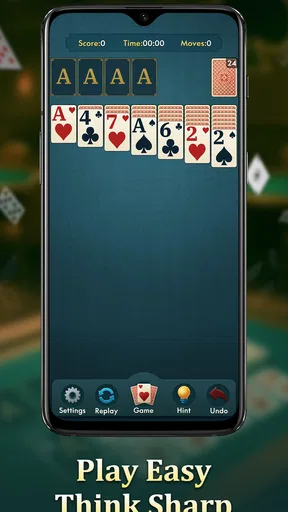
The app presents the classic Klondike Solitaire setup, but don’t let that fool you into thinking it’s just another run-of-the-mill card game. The developers have added a few nifty features that spice things up and keep you coming back for more.
Features That Keep You Hooked
One of the standout elements of Solitaire Fun-Classic Card is its daily challenges. These aren’t your typical, "complete the game" tasks. No, these are creatively crafted puzzles that require you to think a bit outside the box. Winning these challenges earns you coins, which you can use to unlock new themes and card backs. It’s a small touch, but it goes a long way in keeping the game fresh.
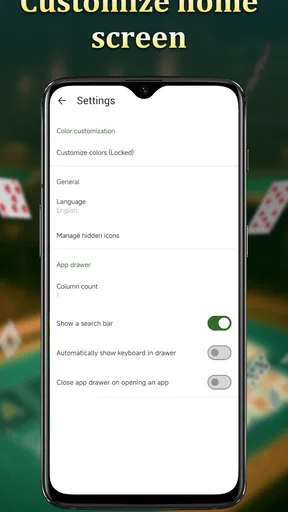
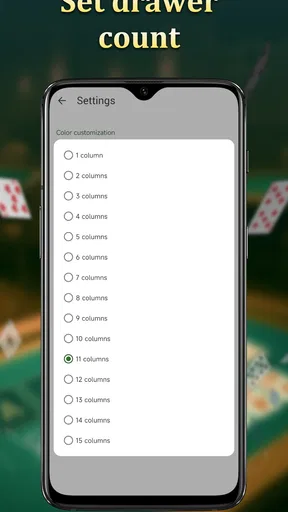
Speaking of themes, the customization options are pretty neat. Whether you’re in the mood for a classic green felt look or something more vibrant, there’s something for everyone. And if you’re anything like me, you’ll find yourself switching things up just to keep the experience lively.
Gameplay and User Experience
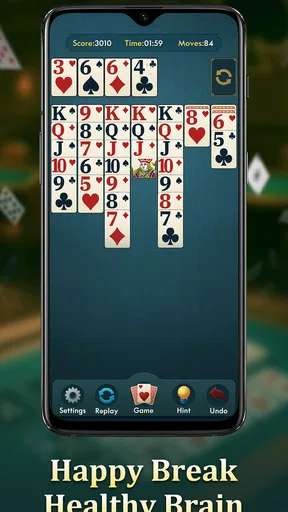
Now, let’s talk gameplay. The controls are super responsive, which is crucial for a game that relies on precise card movements. Dragging and dropping cards feels smooth, and the undo button is a lifesaver for when you inevitably make a wrong move (we’ve all been there).
One feature I particularly appreciate is the hint system. Sometimes, you just hit a wall, and it’s nice to have a little nudge in the right direction. The hints are subtle enough not to spoil the challenge but helpful enough to keep you from pulling your hair out.
Why You Should Give It a Shot
So, why should you download Solitaire Fun-Classic Card? Well, aside from the nostalgic trip down memory lane, it’s just plain fun. Whether you’re looking to kill a few minutes in line at the grocery store or unwind after a long day, this app provides a perfect escape.
Plus, it’s not just about playing Solitaire. The app tracks your stats, so you can see how you stack up against your past performances. There’s something oddly satisfying about beating your own record time, and it adds a competitive edge to what is traditionally a solo endeavor.
Final Thoughts
In a world filled with flashy, complicated games vying for our attention, Solitaire Fun-Classic Card is a breath of fresh air. It’s simple, engaging, and most importantly, fun. Whether you’re a seasoned Solitaire pro or a newcomer looking to dip your toes into the world of card games, this app is a must-have. So, give it a download and let the card-flipping fun begin!
Where its return loop works best
The challenge-and-unlock loop gives a regular player something to work toward beyond finishing the current hand. If I have a few minutes on several days, a daily puzzle can act as a small appointment with the game; the reward offers a reason to come back, while themes and card backs let me change the visual setting without changing the rules I already know. That is a modest kind of progression, not a substitute for new mechanics, and I think it works best when I enjoy the card puzzle first.
There is also a useful trade-off in that routine. A challenge can make a familiar game feel more focused, but a daily goal can turn a relaxing pastime into one more task if I start treating it as a streak I must protect. I would play the challenge when it sounds appealing and leave it alone when I only want an ordinary round. The app is at its best when its goals add direction without making a short break feel like an obligation.
Practical ways to get more from a hand
For a more thoughtful game, I try to keep the stock and tableau decisions connected. Before drawing again, I scan the visible columns for moves that uncover a face-down card or create a useful sequence. I also avoid moving a king into an empty space automatically: opening a column can be valuable, but it is more useful when I have a plan for what will go there. This is not a hidden feature; it is a simple way to make the familiar rules reward patience.
When a deal seems stuck, I use undo as a comparison tool. I can test one legal move, note what it reveals, and return to consider another route rather than treating the button as a way to erase every imperfect choice. Hints are better saved for a genuine pause, especially if I am learning. This approach makes the controls serve the puzzle instead of flattening it, and it keeps me from confusing a quick win with a better decision.
Choosing it over other card and puzzle options
A physical deck remains a good choice when I want to avoid looking at a screen, and it gives me complete control over handling and pace. A digital version is more convenient when I am out, and the original review’s account of responsive dragging, undo, and hints points to practical help for playing on a small touchscreen. Against a bare-bones Solitaire app, the described challenge rewards, themes, card backs, and stats offer extra reasons to revisit it. Against a puzzle game with changing rules, though, this one may feel repetitive: its appeal is the familiar card logic, not constant novelty.
I would also keep the setting in mind. Since it is rated Teen, it is sensible to check that age label when choosing a game for a younger player. The game is free, so there is no purchase decision to make before trying it, but free does not automatically mean it is the right fit for every person. Someone who dislikes recurring goals, wants a multiplayer contest, or needs a strong sense of campaign progress may be happier elsewhere. Players who want an uncomplicated solo card puzzle are much closer to its intended audience.
How to decide whether to keep playing
If I were trying it for the first time, I would start with a regular deal and see whether the card layout feels comfortable on my screen. After that, I would try a challenge and decide whether its extra objective makes the session more satisfying or simply adds pressure. I would change a theme only if the default look stopped feeling pleasant, then use the stats as a personal reference rather than a scorecard. That order keeps the first impression centered on the actual puzzle instead of on rewards.
It is also worth separating a bad deal from a bad fit. A run that does not go anywhere is part of this style of Solitaire; if I repeatedly find the card sequencing dull even when I use hints sparingly, a different puzzle genre is probably a better match. If I enjoy working through the columns but lose interest once the hand ends, the challenge and customization may help, though they cannot turn the core loop into a different game. That is the key question to ask before making it a regular habit.
A sensible expectation for long-term play
With 500 thousand or more installs and an average score of 4.4, it has attracted a substantial audience, while its current version is 3.1.0 and it supports devices running Android 8.0 or later. The developer is Game Cock Team. I see those details as useful context, not a promise that every session will be compelling: whether the app holds attention depends on how much pleasure you get from repeated Klondike decisions and small personal improvements.
My recommendation is therefore specific. I would keep it in mind for calm, bite-sized play, especially if I enjoy a familiar card puzzle and appreciate optional goals that can add a little momentum. I would skip it if I am looking for a deep progression system, a radically varied set of puzzles, or competition with other players. The clearest reason to try it is the chance to make an everyday pause feel quietly engaging; the clearest reason to move on is simply that this kind of Solitaire can only stay fresh for as long as its basic decisions interest you.
Pros
- Smooth and intuitive interface design.
- Multiple game modes available.
- Offline play supported.
- Daily challenges for extra rewards.
- Customizable card decks and backgrounds.
Cons
- Contains frequent in-app ads.
- Limited free features without purchases.
- Some levels feel repetitive.
- Occasional app crashes reported.
- Requires a stable internet for updates.
FAQs for Solitaire Fun-Classic Card
What features does Solitaire Fun-Classic Card offer?
Solitaire Fun-Classic Card offers a variety of features including a classic solitaire experience with customizable card designs and backgrounds. The app includes daily challenges, hints, and undo options to enhance gameplay. It also tracks your progress with statistics and achievements, making it perfect for both beginners and seasoned players.
Is Solitaire Fun-Classic Card free to play?
Yes, Solitaire Fun-Classic Card is free to download and play. However, it may include in-app purchases for additional features or to remove ads. These purchases are optional and do not affect the core gameplay, allowing players to enjoy the game without spending money.
Does Solitaire Fun-Classic Card require an internet connection?
No, Solitaire Fun-Classic Card does not require an internet connection for the core gameplay. You can enjoy the classic solitaire experience offline. However, an internet connection may be needed for certain features like daily challenges or to access in-app purchases.
Can I customize the appearance of the game?
Absolutely! Solitaire Fun-Classic Card allows players to customize the look of the game. You can choose from a variety of card designs and backgrounds to suit your personal style. This feature enhances the user experience, making each game feel fresh and engaging.
Are there any ads in Solitaire Fun-Classic Card?
Yes, the free version of Solitaire Fun-Classic Card includes ads. These ads help support the developers and keep the game free for everyone. If you prefer an ad-free experience, the app offers an option to remove ads through a one-time in-app purchase.


